You can check from the SurveyStance portal whether each iPad kiosk is online and showing your survey, without having to walk over to it.
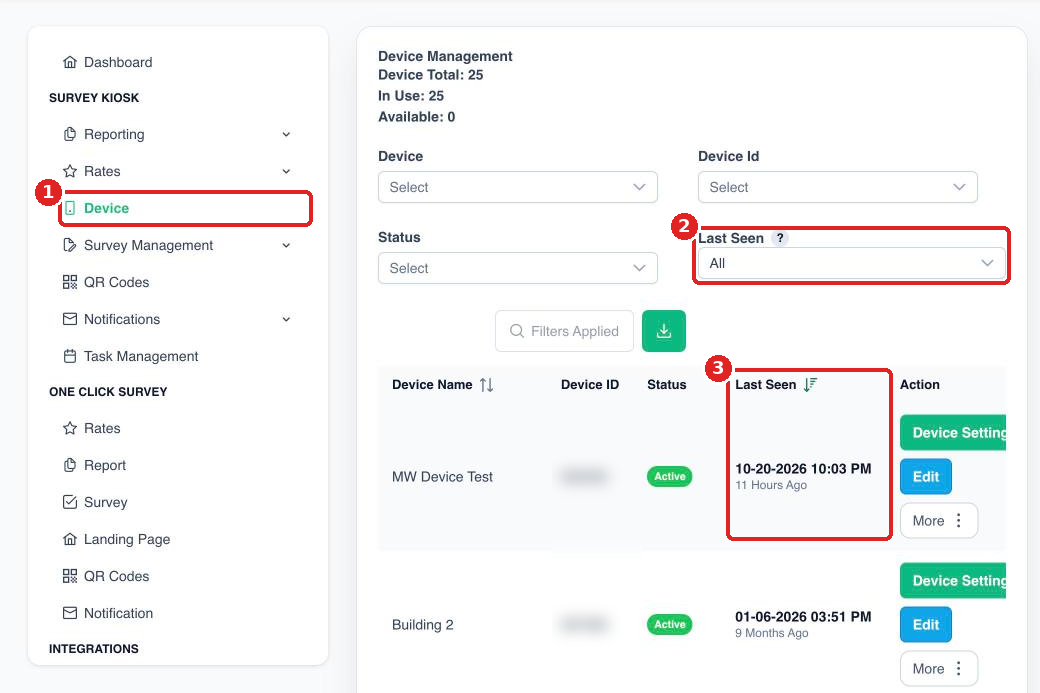
Step 1: Log in to app.surveystance.com and go to Survey Kiosk > Device.
Step 2 (optional): To find kiosks that may be offline, use the Last Seen filter. Choose a timeframe, then pick Seen to see devices that were active in that timeframe, or Not Seen to spot devices that haven't checked in.
Step 3: Check the Last Seen column. It shows the last time each device was seen running in kiosk mode, along with how long ago that was. It updates about every 15 minutes.
If a device hasn't been seen recently
- Make sure the iPad is turned on and plugged in.
- Check that it's connected to WiFi. See Checking iPad WiFi Connectivity.
- Make sure the SurveyStance app is open and your survey is launched. See Launching Your Survey On Your iPad Device.
Tip: You can be alerted automatically when a kiosk goes offline. See Device Offline Alerts.