One Click Feedback/ Email Signature Surveys can now present questions on the landing page based on the initial feedback rating. So if you want to ask for additional information and/or follow up questions only if they select a positive or negative rating, you can do so!
For example.) If you'd like to ask what went well or what went poorly, you can now ask "What went well" if a positive rating was selected and separately, "What went poorly" if a negative rating was selected.
To set up your landing page custom questions, follow these steps:
1. Left Side Navigational Panel - Under One Click Survey
2. Landing Page
3. Click Edit for the Landing Page you wish to update
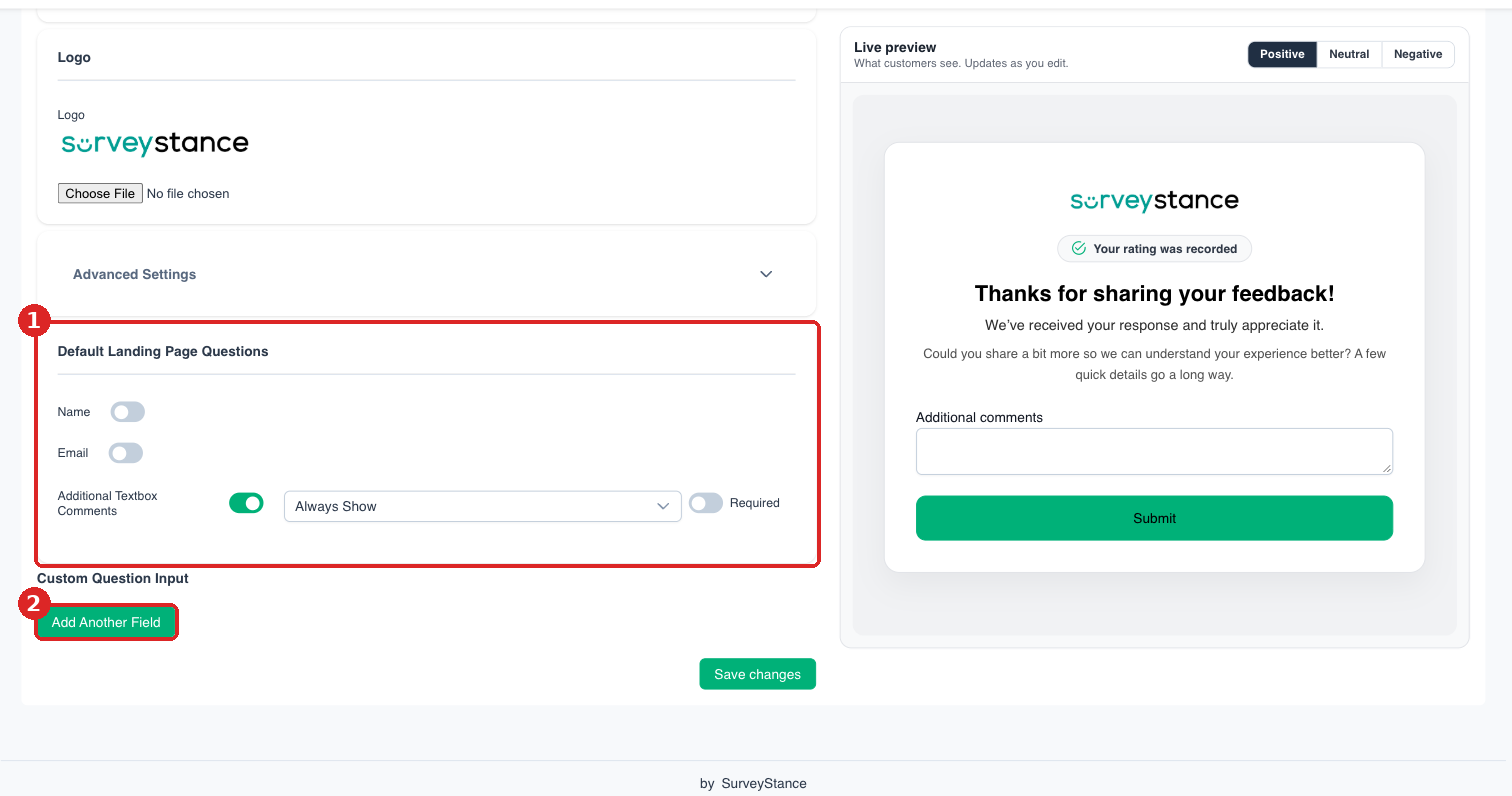
4. Scroll down to Landing Page Questions / Custom Question Input as shown below
5. Use the drop down filters next to Questions on when you would like that Question to be asked. Options are: Always Show, Only Show On Positive, Only Show On Neutral, Only Show On Negative.
6. Scroll to the bottom of the page and click Save changes